
Create Quest Definitions
This guide explains how to configure Quest Definitions, the backbone of your game's mission and achievement systems.
1. Core Purpose of Quest Definitions
- Quest Definitions use their own dedicated tracking system. Creating quests does not consume your Item Limit.
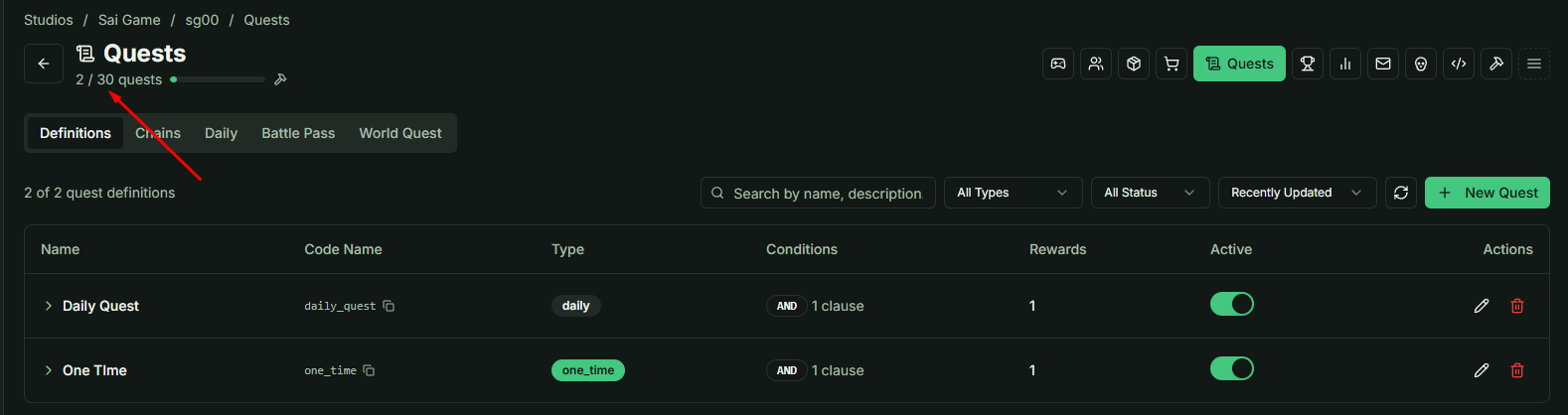
- A Quest Definition is a template. It doesn't do much on its own; instead, it is designed to be plugged into other specialized systems:
- Chain Quests: Used for linear storytelling where one task leads to another.
- Daily Pools: Used to randomly assign tasks to players every day.
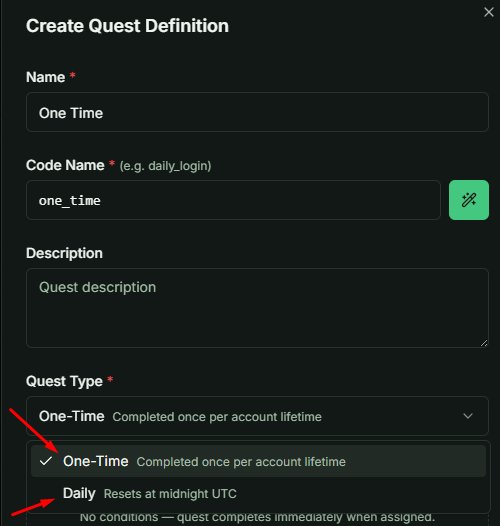
Quest Life-Cycle Types
- One-time: Typically used in Quest Chains. Once a player completes and claims this quest, it is gone forever for that account.
- Daily: Used in Daily Pools. These are designed to be assigned, completed, and reset on a 24-hour cycle to maintain daily engagement.
2. Logic & Condition Clauses
Conditions (Clauses) define what the player must achieve. You can set the logic to AND (must complete ALL clauses) or OR (complete ANY one clause). Note: You cannot mix AND/OR logic within a single quest definition.
Detailed Clause Breakdown
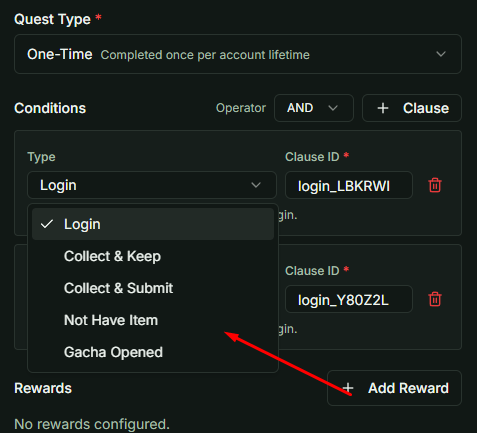
🚩 Login
- The Reality: This exists primarily as a placeholder or a "free" trigger. In the current implementation, it doesn't require specific gameplay action other than the user being authenticated. It is often used for "Welcome Back" style tasks.
🎒 Collect and Keep (item_collect)
- Behavior: The system checks the player's inventory for specific items and quantities.
- The Benefit: Items ARE NOT removed from the player's inventory upon completion. The player simply needs to prove they "own" the items to pass.
📥 Collect and Submit
- Behavior: This is a "Turn-in" mission. The player must gather the items and surrender them.
- The Cost: Upon claiming the reward, the required items are permanently deducted from the player's inventory.
🚫 Not Have Item (The "Gatekeeper")
- Behavior: This condition is satisfied only if the player DOES NOT possess a specific item.
- Strategic Use: This is essential for branching storylines.
- Example: If a player completes a quest to "Assassinate NPC" you can grant them a hidden "NPC is Dead" item. By setting "Not Have Item: NPC is Dead" as a condition for other quests, you effectively block that player from accessing any future storylines involving NPC.
🎁 Gacha Opened
- Behavior: Tracks the player's interaction with the Gacha system.
- Requirement: The player must open a specific number of Gacha packs (either any pack or a specific ID) to satisfy the clause.
3. Rewards & Claim Logic
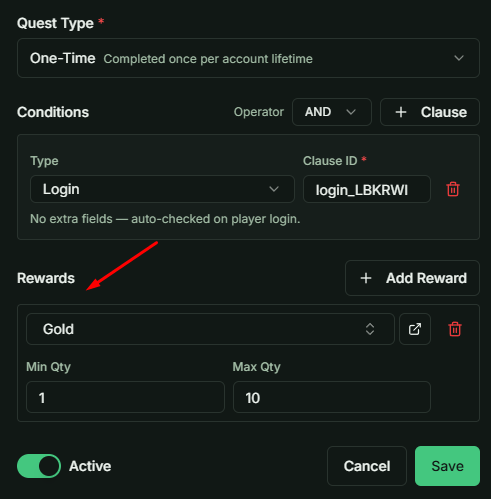
The final step is defining what the player receives upon clicking "Claim."
RNG & Quantity Control
The reward system features a built-in RNG (Random Number Generator) component using Min and Max values:
- Variable Rewards: If you set Min = 5 and Max = 10, the player will receive a random amount between those two numbers.
- Fixed Rewards: If you want a guaranteed, non-random amount, simply set the Min and Max to the same value (e.g., Min = 50, Max = 50).
4. Quick Reference Summary
| Clause Type | Deducts Items? | Best Use Case |
|---|---|---|
| Login | No | Simple engagement checks. |
| Collect & Keep | No | Gear checks or "Hoarding" quests. |
| Collect & Submit | YES | Trading, crafting, or "Bounty" quests. |
| Not Have Item | No | Branching paths and blocking conflicting content. |
| Gacha Opened | No | Monetization and pack-opening milestones. |
Pro Tip: When designing Branching Narratives, always use the Not Have Item clause in conjunction with "Proof of Action" items to ensure player choices have permanent consequences in your game world.